
Proxmox VE Training

Proxmox VE Training
Hands-on Labs for Open-Source Virtualization

Learn and teach Proxmox VE with NDG's fully configured sandbox environment. Practice hypervisor management, VM deployment, and container orchestration directly in your browser — no downloads or setup required.

Browser-Based No Setup Required VMware Alternative Interactive Content
View Courses

Proxmox VE Training

Hands-on Proxmox labs — learn virtualization directly in your browser.

Courses

Why NDG Proxmox Labs Are Different


Fully Configured Sandbox

No downloads, no installs. Launch a complete Proxmox VE environment in your browser and start working with VMs and containers instantly.

Interactive HTML5 Content

Guided lab exercises, embedded videos, graded assessments, and challenge labs — all within the lab environment.

Open-Source VMware Alternative

Learn the platform organizations are adopting as they move away from proprietary hypervisors. Proxmox VE is enterprise-grade and free to use.
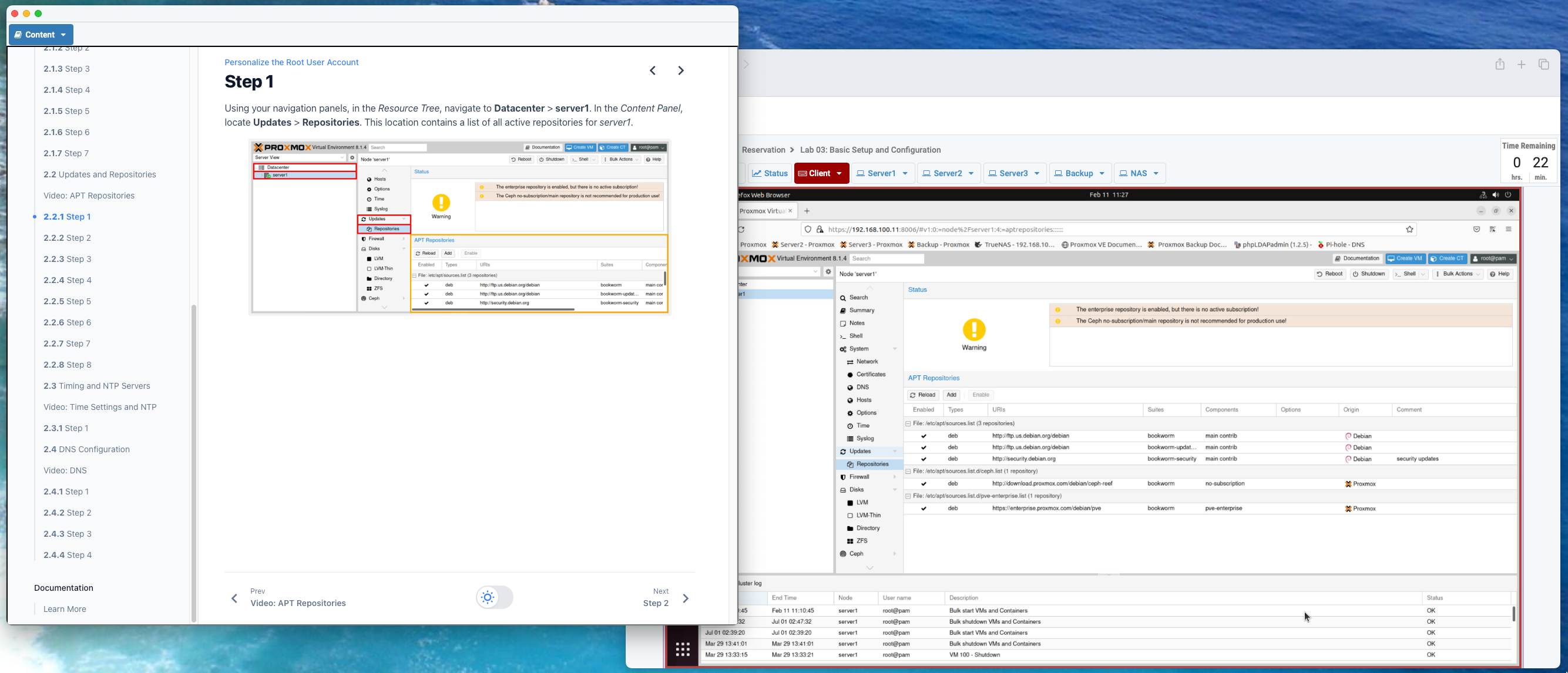
Experience the Lab Environment

See how NDG's Proxmox labs work before committing to a full course. The sandbox gives you a guided preview of the hands-on learning experience.

  • Instant browser access
  • No account or purchase required
  • Guided sample lab exercises
  • Preview the Proxmox VE web interface
Explore Courses

Why Proxmox VE Matters


Proxmox Virtual Environment is an enterprise-grade, open-source virtualization platform built on KVM and LXC. It provides a powerful web-based management interface for deploying and managing virtual machines and containers at any scale.

With growing enterprise adoption and an active open-source community, Proxmox VE has become the leading alternative to proprietary hypervisors. Organizations worldwide are choosing Proxmox for its flexibility, cost savings, and freedom from vendor lock-in. Learning Proxmox now positions you at the center of this shift.

Moving from VMware to Proxmox

Following Broadcom's acquisition of VMware, many organizations and academic programs are re-evaluating their virtualization strategy. VMware IT Academy has been discontinued, and licensing changes have prompted widespread migration to open-source alternatives.

NDG's Proxmox VE labs provide a direct path forward — giving educators and IT professionals the hands-on training they need to transition from VMware ESXi to Proxmox VE with confidence.

VMware Transition Details
VMware vs Proxmox Comparison

What's New in Proxmox VE

NDG continually updates our Proxmox labs to reflect the latest features and best practices. Our current labs cover:

  • Proxmox VE setup and management
  • VM and container deployment
  • Storage and networking configuration
  • Cluster and high-availability setup
  • Backup and snapshot management

What's New in Proxmox VE 9


Proxmox VE 9 brings significant improvements to the platform, and NDG's updated courses cover the latest capabilities. Whether you're upgrading from VE 8 or starting fresh, the VE 9 courses reflect the current state of enterprise Proxmox deployment.

Upgrading from v8? The course structure remains familiar, with updated content covering new features and workflows introduced in VE 9.

  • Updated kernel and QEMU for improved VM performance
  • Enhanced web interface and management tools
  • Improved storage and networking capabilities
  • Updated Ceph and ZFS integration
  • Latest security patches and hardening

Who This Is For


  • IT educators and instructors
  • Students in virtualization courses
  • IT pros evaluating VMware alternatives
  • System administrators learning Proxmox
  • Certification and career development
  • Organizations planning hypervisor migration

Frequently Asked Questions


Proxmox Virtual Environment (Proxmox VE) is an open-source server virtualization platform built on KVM and LXC. It provides enterprise-grade features for managing virtual machines and containers through a web-based interface.
Yes. Proxmox VE is widely adopted as a VMware alternative, offering comparable virtualization features with an open-source license model. Many organizations have migrated from VMware ESXi to Proxmox VE, especially following Broadcom's acquisition of VMware and the discontinuation of VMware IT Academy.
No. NDG's Proxmox labs run entirely in your browser. There is nothing to download, install, or configure — just launch a lab and start learning.
Yes. NDG's Proxmox labs are designed for both individual learners and academic programs. Educators can use the labs to teach virtualization, hypervisor administration, and open-source infrastructure management.
Both are Type 1 hypervisors for server virtualization. Proxmox VE is open-source and free to use, while VMware ESXi requires commercial licensing. Proxmox supports both KVM virtual machines and LXC containers, and includes a built-in web management interface. See our full comparison.
NDG Proxmox VE courses are available through NDG Online with individual access pricing, and through NETLAB+ for institutional deployments. Visit the course pages below for current pricing and access duration options.
Proxmox VE 9 is the latest major release with an updated kernel, improved performance, and new features. NDG offers courses for both versions. If you are starting fresh, the VE 9 courses cover the latest platform capabilities.
Yes. NDG's Proxmox VE courses are direct replacements for VMware IT Academy content. Setup and Management replaces VMware vSphere ICM, and Advanced Administration and Optimization replaces VMware vSphere OSS. See our full comparison and curriculum mapping.

Ready to Get Hands-on with Proxmox VE?